





Encrypted iPhone backup
WhatsApp only ships its history inside an encrypted backup. Chatcove sets and remembers a strong password for you.
Chatcove backs up and exports your entire WhatsApp history to your Mac. Buy once. Runs locally. Completely private.
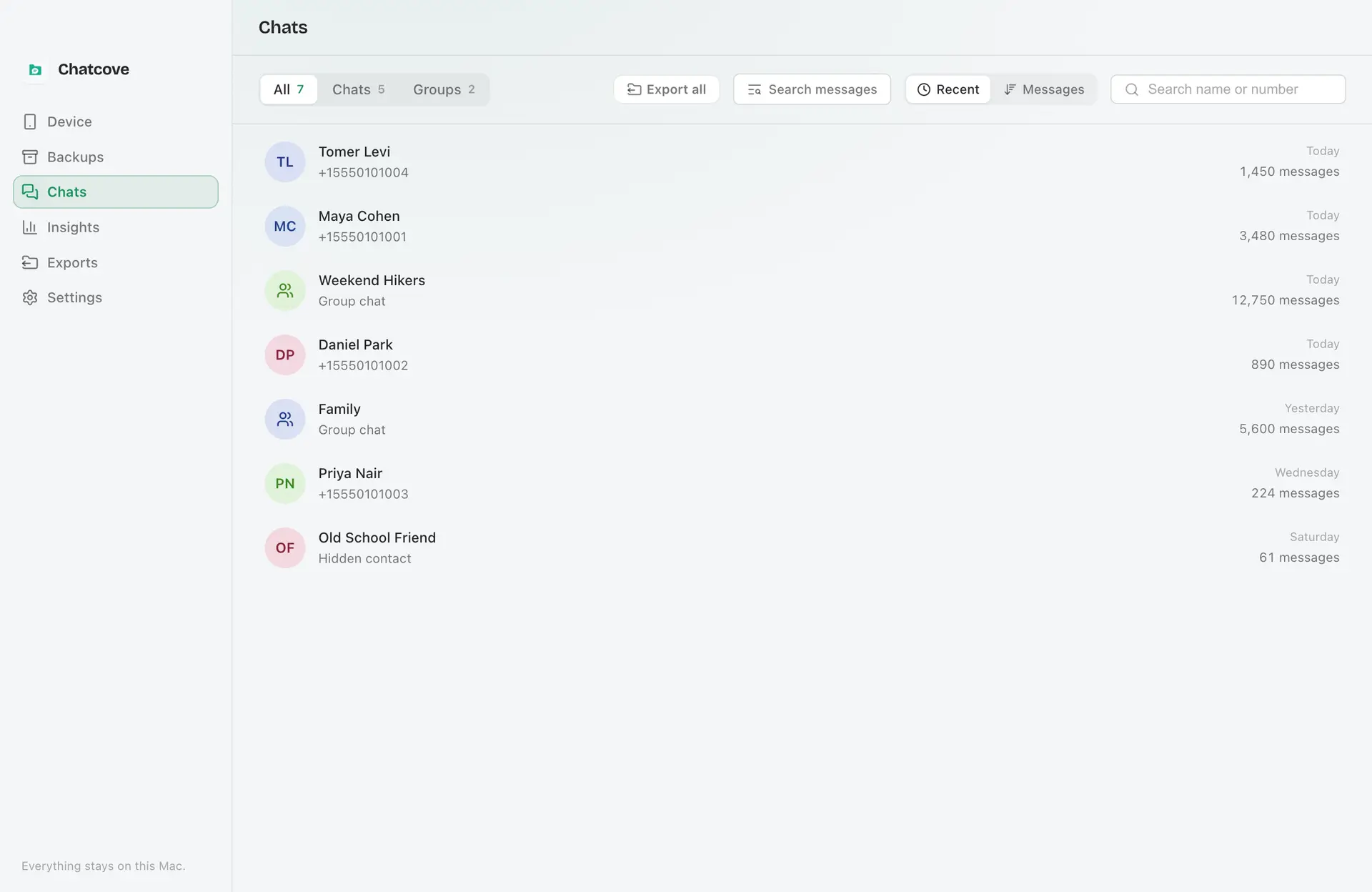
Browse your whole WhatsApp history right on your Mac, with every photo, video, and voice note in place. When you are ready, export any chat to a format you get to keep.
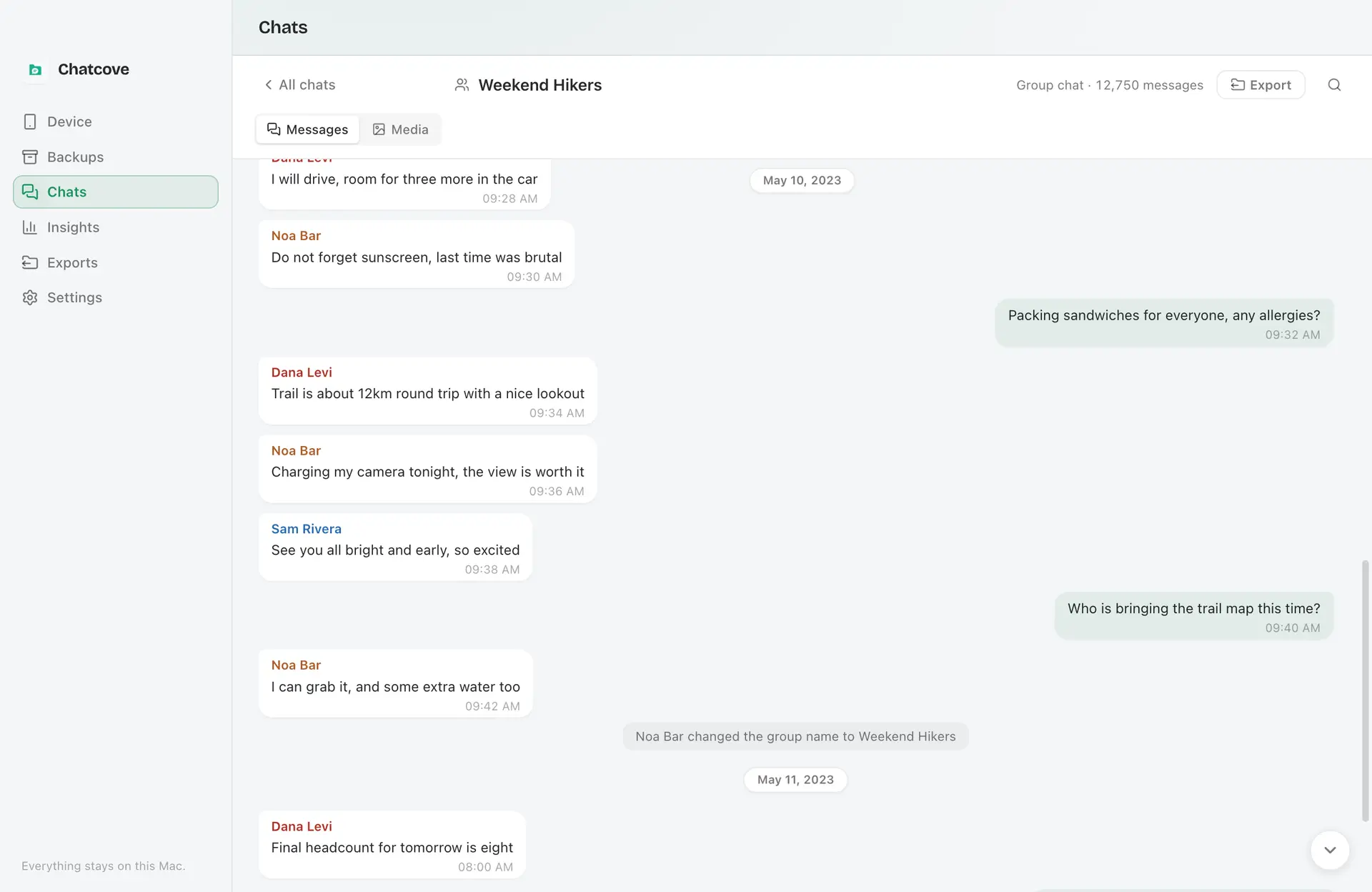
WhatsApp only ships its history inside an encrypted backup. Chatcove sets and remembers a strong password for you.
Full conversations, right-to-left languages, photos, videos, and voice notes, exactly as they were.
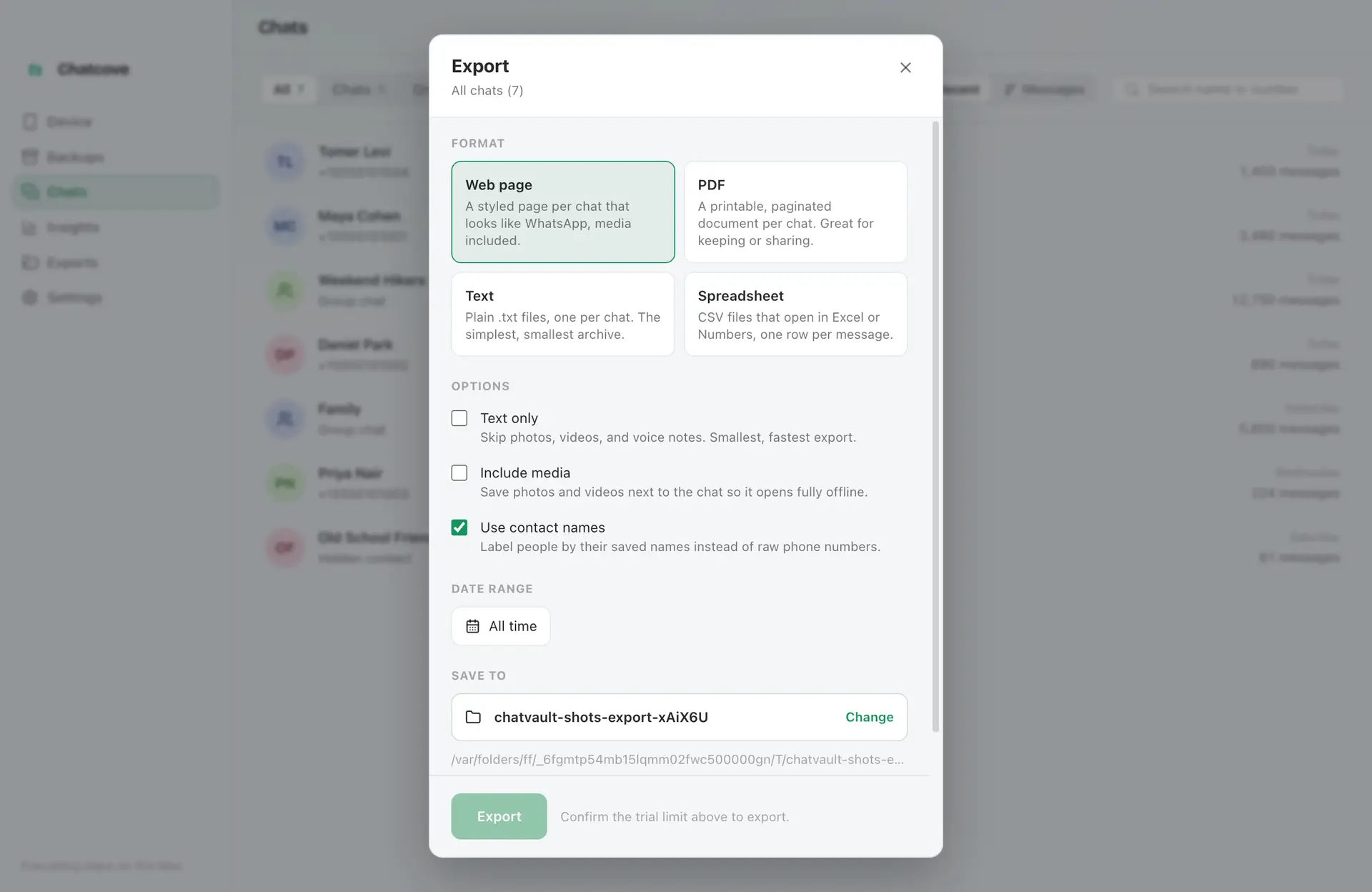
Save any chat as HTML, PDF, TXT, or CSV.
Every photo, video, and voice note, kept with the conversation.
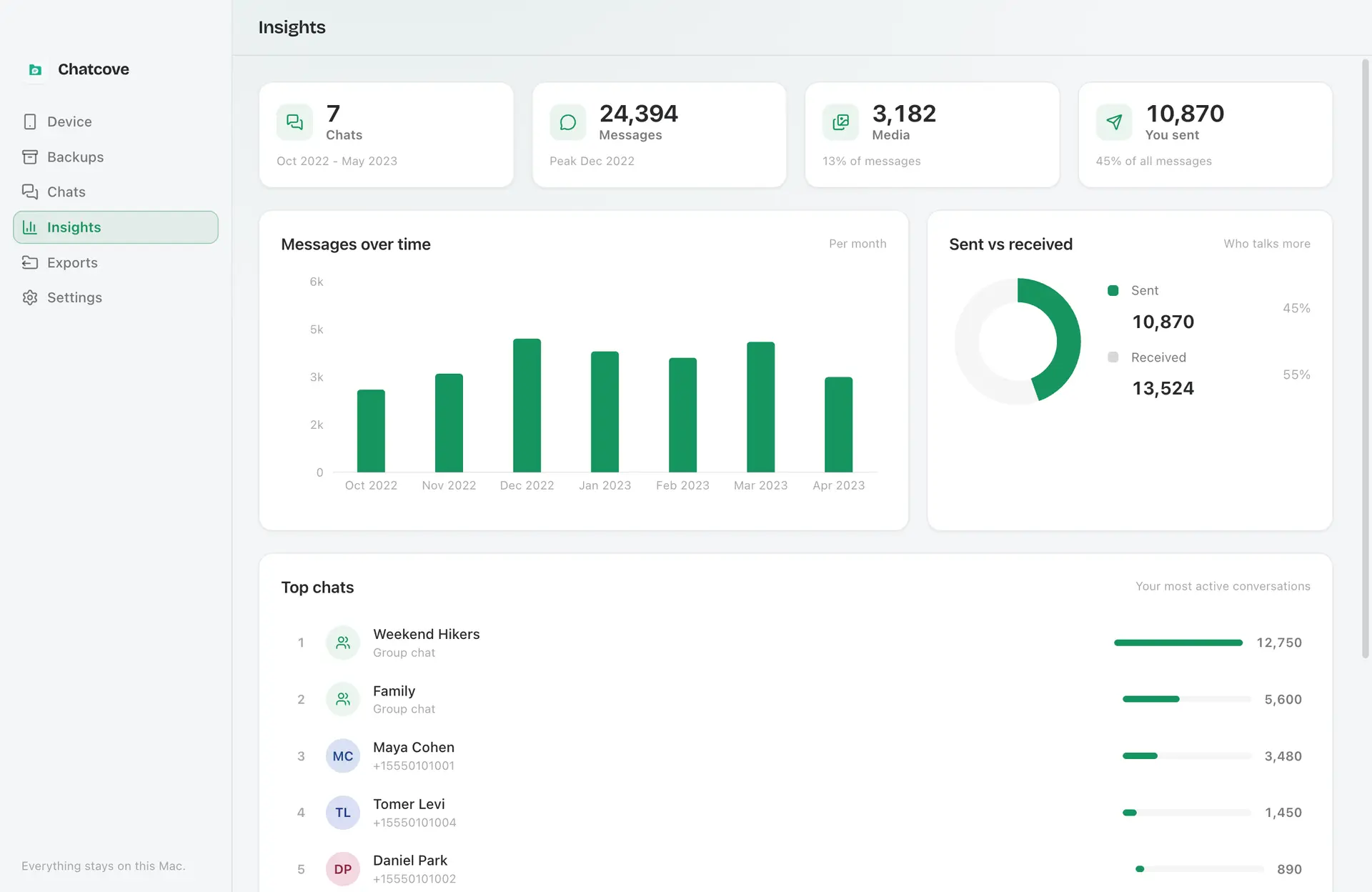
See who you talk to most, when, and how much.
No cloud, no account. Your chats never leave your Mac.
A few minutes, and every chat lives safely on your Mac.
Plug it into your Mac and unlock it.
It turns on encryption and backs up WhatsApp for you. You tap your passcode once.
Read every chat and save it as HTML, PDF, TXT, or CSV.
Privacy is not a setting in Chatcove. It is the architecture. Every step happens on your Mac, from reading your iPhone backup to writing the files you export. Nothing syncs, nothing uploads your history, and nothing phones home with your messages.
Chatcove has no backend for your chats to sit in. There is nothing to sign up for, nothing syncs to a server, and no analytics ever read your chats. No server ever sees your messages.
Every step runs on your Mac: reading the backup, decrypting it, and building your export. None of it touches a server.
Chatcove works from an encrypted iOS backup, so your history is protected by Apple's own encryption on the way in.
Chatcove opens your databases read-only. It reads your history and never writes back to your phone.
Export to plain HTML, PDF, TXT, or CSV. Standard files you can open, search, and keep forever, with no lock-in.
Zero analytics on your chat content. Chatcove does not measure, profile, or report what is inside your conversations.
The only automatic network calls Chatcove makes are license checks and update checks, and your messages are never part of them. A problem report goes out only if you choose to send one.
Back up, browse and export with the network off. The only automatic network calls Chatcove makes are an update check and a license check, which registers your Mac when you activate and lets it work offline for up to 21 days between re-checks. Your messages are never part of either. Nothing else leaves your Mac unless you choose to send us a problem report.
Saving your chat history is something most people do once, when they change phones. Chatcove is priced like that, and you can read your whole history before deciding to pay at all.
“In June 2025, we discontinued the device license and now only offer subscriptions.”
One time · 2 Macs
Read your entire history before you pay anything
One time · 2 iPhones
One time · 3 phones
Subscription only · 1 device ($49.99 for 5)
Retired its one-time licence in June 2025
One time, or $29.95/yr · 2 Macs
One time, or $44.99/yr · 1 computer
One time, or $59.95/yr · 1 Mac
Prices are the cheapest tier that exports WhatsApp on a Mac, in US dollars before tax, checked on each vendor's own store page on 8 October 2026. “Not stated” means the vendor's page does not say. Prices change, and these may have moved since. All trademarks belong to their owners.
No subscription, no account, no cloud. Pay once and Chatcove is yours.
Buy once. Yours forever. Not a subscription.
Browse everything free. The trial also includes 3 exports of one chat each, with a small watermark, so you can see exactly how it works before you buy.
Requires an Apple Silicon Mac (M1 or later) on macOS 12 Monterey or later.
30-day money-back guarantee.
Short, honest answers. If yours is not here, email hello@chatcove.app.
For one conversation as plain text, WhatsApp's built-in Export Chat is free and enough. For your whole history in a readable format, with photos, videos and voice notes in place, use a Mac app that reads an encrypted iPhone backup. Chatcove does this for $9 once: it backs up the iPhone locally, lets you browse every chat, and exports to HTML, PDF, TXT or CSV.
Yes. iMazing has been subscription-only since June 2025, from $29.99 a year for 1 device. Chatcove does the WhatsApp export part for $9 once on up to 2 Macs. iMazing does much more (it is a full device manager) and runs on Intel Macs and Windows, which Chatcove does not.
Not with WhatsApp's own export, which produces a text file and loose attachments. Chatcove lays out the conversation with each photo where it was sent and exports it to PDF or HTML. Voice notes play in the HTML export; in a PDF they appear as an entry with sender, time and length.
Yes. Chatcove's CSV export has one row per message with the time (in UTC), sender and text, written as UTF-8 so Excel shows emoji and non-Latin text correctly. It can also write one combined file with every chat.
Yes. Chatcove is $9 once for up to 2 Macs. Of the paid tools we compare, Backuptrans, Decipher Chat, Dr.Fone, iCareFone and MobileTrans also sell one-time licences, at higher prices; iMazing is subscription only.
Yes. Chatcove makes a standard encrypted iPhone backup, which is where WhatsApp keeps its history.
Apple Silicon Macs (M1 or later) running macOS 12 Monterey or later, up to and including the current macOS. Intel Macs and macOS 11 or earlier are not supported. If you need Intel support, email hello@chatcove.app and we will tell you when that changes.
Completely. Everything runs on your Mac, with no cloud and no account, and your chats never leave your machine. The only automatic network calls are a license check and an update check, and neither carries any chat content. Nothing else leaves your Mac unless you choose to send us a problem report, and you see everything in it before it goes.
Backing up, reading, searching and browsing your whole history with its media are free, with no time limit. The trial also includes 3 exports of one chat each, with a small watermark line, so you can check the output on your own data. Buying removes the limits and the watermark.
Up to 2.
Only for the backup step. After that you can unplug it and keep browsing and exporting on your Mac.
Any chat as HTML, PDF, TXT, or CSV, including media.
No. Chatcove is an independent app by Codama and is not affiliated with WhatsApp or Meta.
Yes, there is a 30-day money-back guarantee.
Not yet. Today Chatcove focuses on WhatsApp; iMessage is planned.
Buy once for $9 and use Chatcove on up to 2 Macs. Free to try: browse every chat, and export up to 3 chats, one at a time, before you pay. Everything runs on your Mac.
Requires an Apple Silicon Mac (M1 or later) on macOS 12 Monterey or later.
Questions? Email hello@chatcove.app